CANTI Admin Dashboard for a learning platform
An admin dashboard designed to manage operations for a learning platform.
Role
UX Designer | UI Designer | Design Lead
Industry
EdTech
Duration
Dec 2024 (3 months)
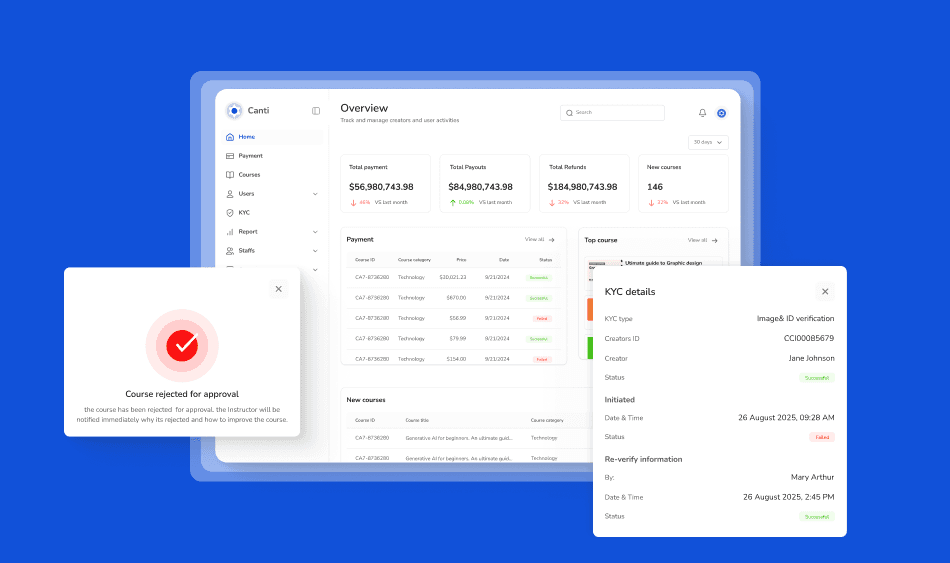
Overview
Canti is an admin dashboard built to manage the backend operations of an educational platform. It supports admin users in approving courses submitted by tutors, managing disputes, processing payouts, and ensuring the overall health of the platform’s tutor-student ecosystem. It was created to streamline internal workflows while maintaining transparency and oversight across teams.
The Problem
The client team managed course uploads, tutor operations, ticket handling, and payout processes using disjointed tools like spreadsheets, forms, and messaging apps. This led to:
Missed approval deadlines
Payout errors and inconsistencies
Poor ticket response tracking
Inefficient coordination across departments
The team needed a unified interface to oversee platform operations, enhance communication between admins and tutors, and reduce manual work.
Goals
Create a clear approval workflow for tutor-submitted courses
Enable efficient ticket management between tutors, students, and admins
Streamline file/document management
Provide visibility into payment history and payout status
Equip admins with filtering, search, and bulk action tools
User Research Method
I conducted user interviews with 4 platform admins, 2 operations leads, and 3 tutors. I also reviewed the existing operational tools used internally.
Key Insights
Admins needed a way to track tutor submissions without multiple follow-ups.
Payment and payout tracking was scattered across multiple spreadsheets.
Admins spent hours weekly resolving tickets without any categorization or priority system.
Tutors often uploaded incomplete or low-quality courses, delaying the review process.
User Personas
Persona 1 – Platform Admin
Name: Dara
Role: Course Review & Support
Goals: Track submissions, respond to tickets, and ensure tutor quality
Frustrations: No centralized tool for course approval or ticket tracking
Persona 2 – Operations Lead
Name: Tolu
Role: Manages payouts, performance reports
Goals: Monitor payouts, manage disputes
Frustrations: Spending hours resolving payout errors from inconsistent data
Information Architecture
I mapped out the entire backend user flow—starting from course submission, approval, and revision requests, to payout processing and ticket escalation. The architecture was broken into modules:
Courses: Submission → Review → Approve/Reject → Publish
Tutors: Profiles, Status, Activity Log
Tickets: Create → Assign → Prioritize → Resolve
Finance: Payout Requests, Transaction Logs
Files: Uploads, Guidelines, Shared Resources
Key Features
Ticketing System with categories, priorities, and assignment logic
Course Submission Module with approval history and revision support
Payments Section showing tutor earnings, payout status, and filterable logs
Tutor Management with verification steps and activity summaries
Admin Tools like user roles, bulk actions, filters, and search
Wireframes & Flow Mapping
I started with low-fidelity wireframes to ensure functionality came first. I validated the wireframes with the product manager before proceeding to the visual design.

Design System
To maintain consistency, I created a modular and scalable design system using:
4pt grid system
Custom components for tables, alerts, buttons, tags, and modals
Accessible color palette
Typography tokens for hierarchy
UI feedback components (loading, error, empty states)


Final UI Designs
The UI design focused on clarity, task orientation, and reducing visual noise. Each screen was designed to reduce friction in admin decision-making. I included table views, detailed drawers, modals for edits, and dashboard-level analytics.


Other projects

Homechow: Redefining quick fresh meals for companies and individual in Newyork
Designing mobile app, food Kiosk experience designed to help workers and individual access fresh, hot meal.

Wawu – Afro-Caribbean Grocery Marketplace in Canada
marketplace that connects buyers and sellers of African and Afro-Caribbean groceries across Canada.